Less time taking orders
Guests order on their own phones, so floor staff can focus on serving and hospitality, even at peak hours.
Guests order from the QR code on the table, tickets print in the kitchen, and you take payment, issue invoice-ready receipts and track sales in the same system. The POS is free for your first store with no time limit; QR ordering comes with Pro (try it free for 30 days).
Guests order on their own phones, so floor staff can focus on serving and hospitality, even at peak hours.
Orders go straight to the kitchen printer and screen, with drinks sent to the bar and food to the kitchen.
Sales by day, hour and item, guest count, spend per guest and cost rate are totalled for you to plan stock and shifts.
Guests scan the QR code on their table; there is no app to install. They order from a photo menu and choose options such as spice level or naan or rice.
Enter items quickly by number, category or favourites. Move and merge tables, split bills and give discounts; voids and refunds can require a manager's approval.
Orders from QR and POS print automatically on the printer set for each category. The kitchen display shows waiting time by colour, and dishes are marked served with one tap.
See sales by day, hour, payment method and item in charts. Issue receipts that meet the qualified invoice rules on A4 or 80mm paper.
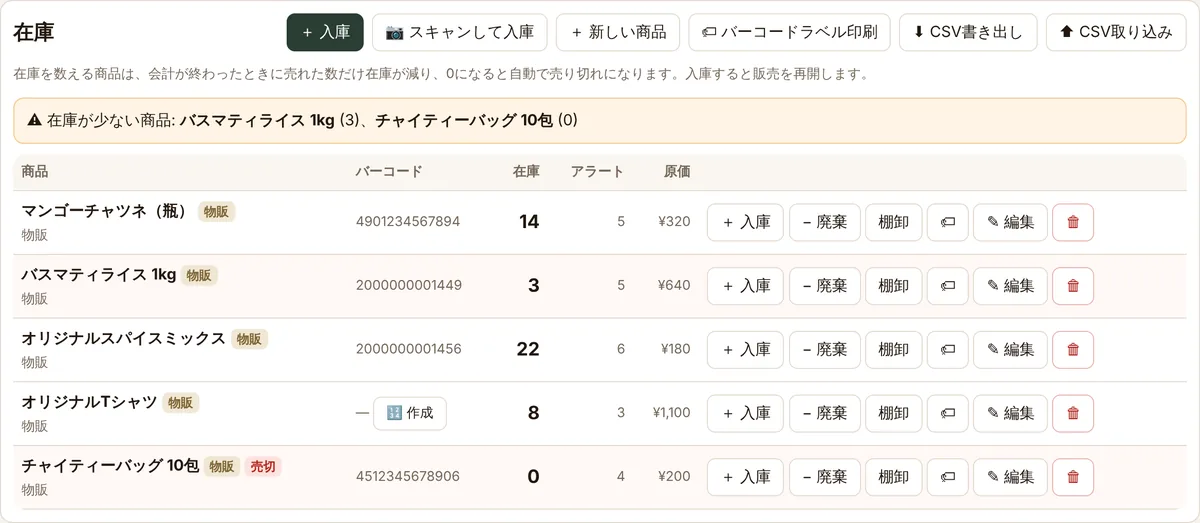
Stock goes down as bills are paid and the item sells out by itself at 0. Record stock in, losses and counts, and sell retail goods such as gifts and bottled sauces on the same POS.
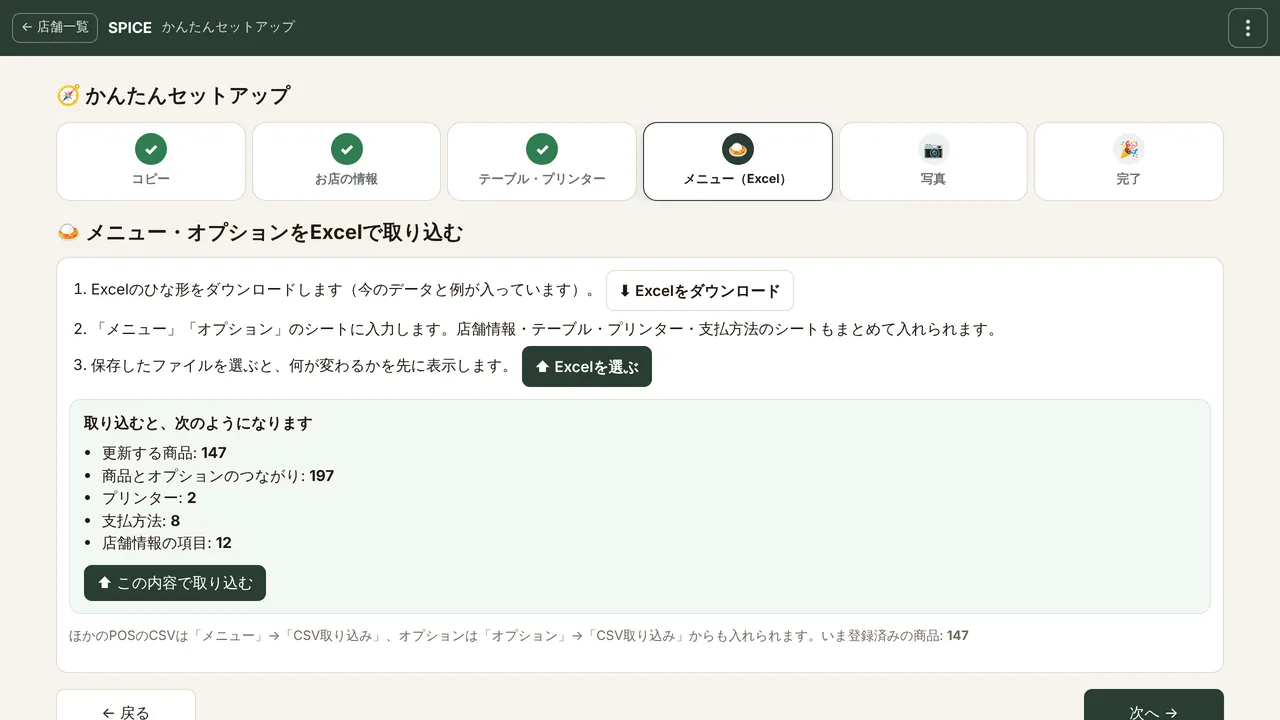
Add a store and you are guided step by step: copy → store details → tables & printers → menu → photos. Menu, options, tables, printers and payment methods come in from one Excel file.
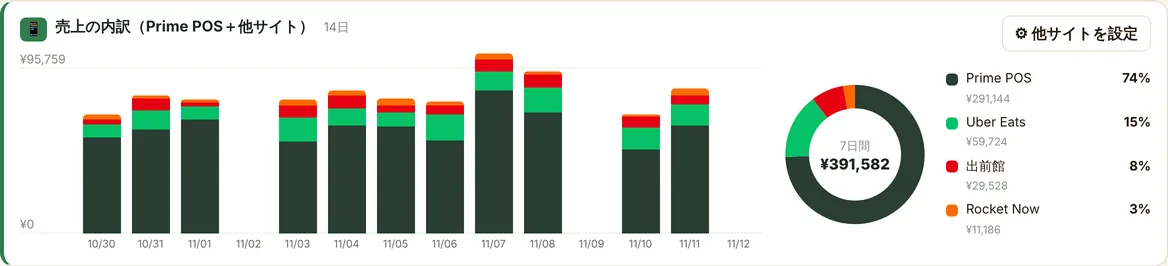
Type in the day’s totals from Uber Eats, Demae-can, Rocket Now and others on the POS after closing, and see them with your Prime POS sales in one chart.
Pro marks a Pro plan feature
All prices include tax. No setup fee and no device contract.
For one store getting started
For stores ready to grow
or ¥14,000 / year (2 months free)
Try it free for 30 days1st store ¥0 + stores 2–3: ¥1,400 × 2
| Stores | 1st store on Free | Every store on Pro |
|---|---|---|
| 1 store | ¥0/mo | ¥1,400/mo |
| 2 stores | ¥1,400/mo | ¥2,800/mo |
| 3 stores | ¥2,800/mo | ¥4,200/mo |
| 5 stores | ¥5,600/mo | ¥7,000/mo |
| 10 stores | ¥12,600/mo | ¥14,000/mo |
| Free | Pro | |
|---|---|---|
| Price (tax incl.) | ¥0 | ¥1,400 / month or ¥14,000 / year per store |
| Stores | 1 store | Add a 2nd store and more on Pro |
| Staff accounts | Up to 3 | Unlimited |
| Service | ||
| POS, split bills, discounts, refunds | ✓ | ✓ |
| Table QR ordering | Menu view only | ✓ |
| Kitchen printers, display & cash drawer | ✓ | ✓ |
| Offline mode | ✓ | ✓ |
| Receipts & invoices (T-number, 8% / 10%) | ✓ | ✓ |
| Online booking & courses | — | ✓ |
| Delivery QR | — | ✓ |
| Reports & management | ||
| Sales reports | Today to last 1.5 months | Any period, CSV export |
| Tax breakdown | View on screen | View and CSV export |
| Smart picks & insights | — | ✓ |
| Menu CSV import | ✓ | ✓ |
| Daily backups | ✓ | ✓ |
| Guest pages | ||
| Store logo | ✓ | ✓ |
| Social links | — | ✓ |
| "Powered by Prime POS" line | Shown | Not shown |
Enter your email and store name. No credit card needed.
Type it in, or import everything from your current POS by CSV.
Open the POS in a browser. The Android app prints straight to your printers.
Print the table QR codes, put them out, and orders start coming in.
Yes. Your first store runs on the Free plan with no time limit. It includes what you need every day: the POS register, kitchen printers and invoice-ready receipts (table QR ordering is part of Pro). There is no setup fee and no device contract.
Pro adds table QR ordering, online booking and courses, delivery QR, reports for any period with CSV export, the tax breakdown CSV, smart picks and insights, and social links, and removes the staff limit. A second store and beyond use the Pro plan.
¥1,400 a month or ¥14,000 a year per store, tax included. Payment is by credit card, and you can sign up, change your card or cancel from your dashboard.
Yes. Each store can try Pro free for 30 days, once. No card is needed, and the store goes back to Free on its own when the trial ends.
Nothing is deleted. Only the Pro features stop; the POS keeps working on Free (the table QR then shows the menu only). If a payment fails, you have 7 days of grace.
Any browser on iPad, Android tablets, phones and PCs. On Android tablets you can also use our app, which prints straight to your printers.
80mm and 58mm thermal printers (ESC/POS) on Wi-Fi or LAN, and Bluetooth printers paired with an Android tablet. You can send drinks and food to different printers.
Yes. Stock goes down as bills are paid and items sell out by themselves at 0. Record stock in, losses and counts, or update everything by CSV. Retail goods such as gifts and sauces skip the kitchen and are reported separately.
Scan barcodes and QR codes with the phone or tablet camera from the button next to the POS search box, or use a USB / Bluetooth reader. For items without a barcode, make an in-store JAN code on the Stock screen and print as many labels as you need on A4 sheets or a label printer.
Yes. Keep your current register and use only table QR ordering and kitchen printing (QR ordering is part of Pro).
The POS keeps taking orders, printing kitchen tickets and taking payments offline, and sends everything when the connection is back.
Import items, prices, costs and options by CSV.
Yes, from one account. The dashboard shows the sales of all stores together or one by one, and a new store can copy the menu and photos of another in one click. Your 1st store is free, and each store from the 2nd adds ¥1,400 a month (tax incl.). For example, 3 stores cost ¥2,800 a month for stores 2 and 3 (¥4,200 if all 3 are on Pro).
Owners use email and password; staff use the store code and a PIN of 4 or more digits. The Free plan allows up to 3 staff.
Sign-up takes a few minutes. No contract and no setup fee.