Managing several stores
Opening a second restaurant does not need a new account. Add the store on your dashboard and switch between stores.
Each store is managed separately
Menu, staff and PINs, tables and QR codes, printers and sales are kept per store. Each store can have its own menu and prices.
The owner dashboard
Your stores are listed on the dashboard, with quick links to each store's POS, admin screen, kitchen display, table QR codes and guest menu. A dot before each name shows which stores have their POS running right now (🟢 open · 🟡 POS offline · 🔴 paused); it refreshes every minute.
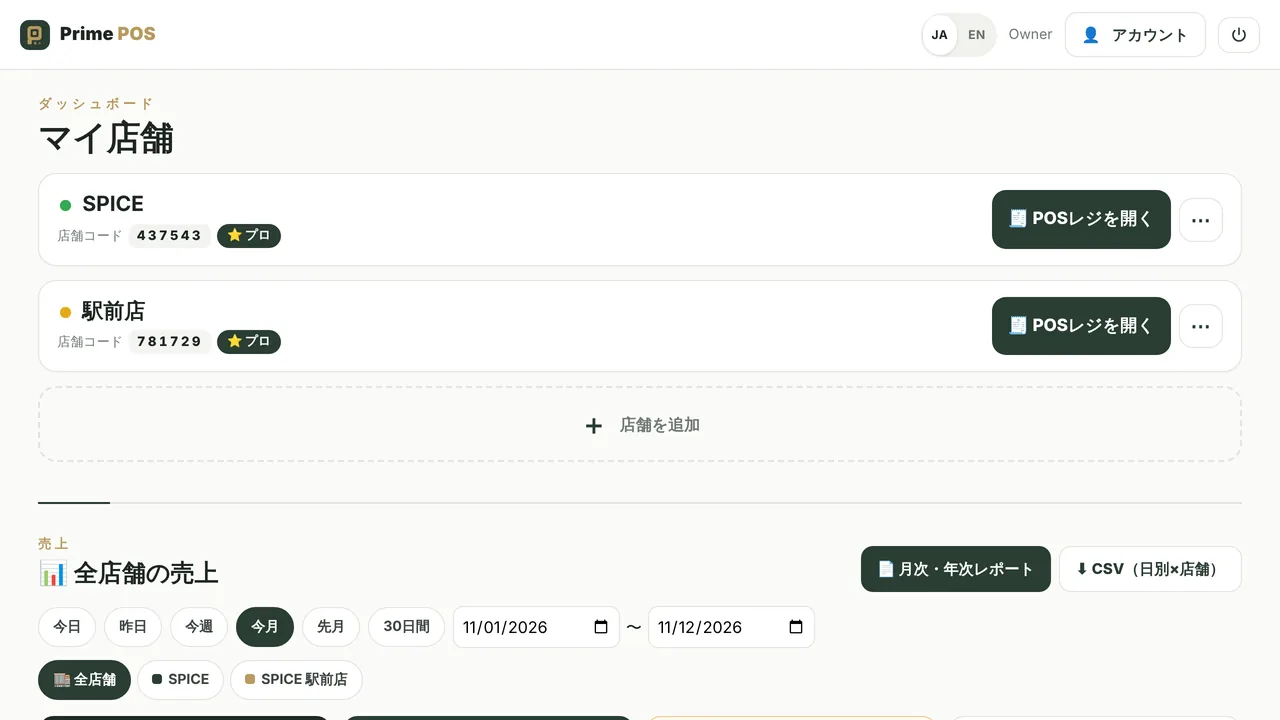
Sales of all stores together, and one by one
“Sales of all stores” on the dashboard shows today, this week, this month, last month or any period for every store at once.
- Totals for all stores: sales, bills, spend per bill, guests, share of QR orders, retail
- A store-by-store comparison and a daily chart, one colour per store
- Top items and payment methods
- Pick a store to see its numbers only
- CSV by day and store, ready for Excel
Copy a new store in one click
When you add a store, copy the menu, photos, options, tables, printers, payment methods and settings of one of your stores. Sales and orders are never copied. You can also copy later from the store’s ⋯ menu.
Pricing
Your first store can use the Free plan. Each additional store uses the Pro plan (¥1,400 a month or ¥14,000 a year, tax included), and each store can try Pro free for 30 days. See pricing.
Related features and guides
Start with one store, free.
Sign-up takes a few minutes, with no setup fee or contract. You can also try Pro free for 30 days.